
by Maya Hatt | Nov 8, 2026 | Business Server |
In today’s digital age, small businesses face a pivotal question: “What does a server do for a small business?” The question is not only technological but also refers to the heartbeat of an information structure of any modern business.
A server gives small businesses one place to store files, run software, and manage shared resources. It also helps teams work together without passing files between computers. So, what does a server do for a small business? It keeps daily tasks organised, makes data easier to access, and supports better security. These benefits can help improve productivity.
Table of Contents
What Type of Server is Best for Small Business
The best server depends on what your business needs it to do. A small office sharing documents won’t need the same setup as a company running large databases.
What Does a Server Do for a Small Business: Choosing the Right Server
Before spending money, think about two things:
- Assessing Needs: How many people need access? What software will they use? How much storage do you need?
- Budget Considerations: Factor in hardware, software licences, setup, backups, and ongoing maintenance.
Types of Popular Servers for Small Businesses
Server costs vary based on storage, performance, and how the system is managed.

|
Server Type |
Estimated Cost (USD) |
Best For |
|---|---|---|
| Cloud Server | $25–$150+/month | Remote teams and hosted apps |
| Dedicated Server | $120–$350+/month | Businesses needing private server resources |
| Shared Server | $5–$30/month | Basic websites and email hosting |
| Local Tower Server | $2,000–$5,000+ upfront | Office files and business software |
| NAS Device | $400–$1,500+, plus drives | File sharing and backups |
These are planning estimates based on offerings from Dell, HPE, Synology, and AWS Lightsail. Setup, storage, licences, and support may cost extra.
How Do I Set Up a Server for a Small or Mid-Sized Business
Before setting up servers for businesses, check your office network and list the tasks your server needs to handle. Once you know what you’re working with, follow these steps:
- Choosing the Right Server: Check what software your team uses and how much space its files take up. Pick a server with room for growth.
- Installation and Configuration: Install the operating system and create accounts for your staff. Give each person access to the files they need for work.
- Network Integration: Connect the server to your office network using an Ethernet cable. Test the connection from different computers to make sure everything works.
- Security Measures: Set up firewalls, install security updates, and restrict access to sensitive files.
- Regular Maintenance: Check system health, monitor storage space, and test backups.
An IT technician can help avoid setup mistakes that might lead to downtime or lost data.
What is the Difference Between a Server and a Host
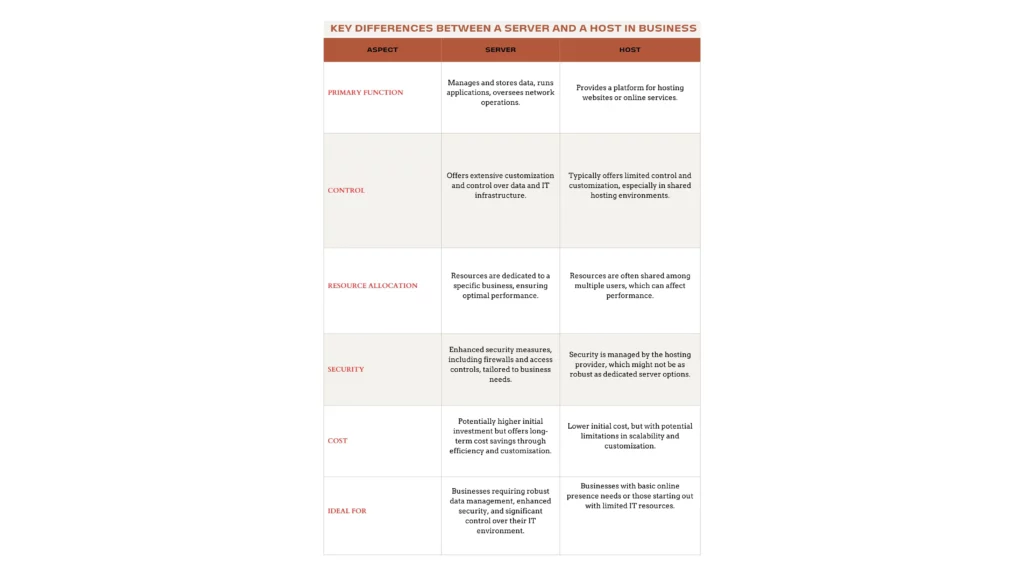
What is the Difference Between a Server and a Host
The terms sound similar, but they don’t always mean the same thing.
Understanding Servers
A server is a computer or software system that provides services to other devices.
- The Role of a Server: Think of it as a shared office computer that holds files and runs programs for the team.
- Customization and Control: You decide who can see certain files and which programs belong on the server.
Understanding Hosts
-
A host is the device or service where a server runs.
- The Role of a Host: A web hosting company rents out the space and computing power needed to run websites or apps.
- Limited Control: What you can install or change depends on the hosting plan you’ve chosen.
Key Differences
- Functionality: A server does the actual work, such as storing files or running an application. The host provides the place for that work to happen.
- Ownership and Management: You might have your own server sitting in the office. You could also pay a hosting company to run it for you.
What is the Purpose of a Company Server
A company server keeps important business tools and information in one place. Here’s how that helps with everyday work.
Data Centralization
Instead of saving files across several computers, staff can use a shared location. This makes records easier to find, manage, and back up.
Improved Collaboration
Say your bookkeeper works from home while your manager is at the office. Both can open the same approved reports without sending files back and forth. It’s also easier to keep track of which copy is current.
Enhanced Security
Not everyone in the office needs access to payroll records or client details. A server lets you decide who can open certain files. You’ll still need secure passwords, regular updates, and backups to keep that information safe.
Network Management
When someone new joins the team, IT needs to set up their access. A server makes it easier to handle shared printers, user accounts, and office files from one place. There’s less need to change settings on every computer.
Cost-Effective Operations
Running several separate systems can become expensive to maintain. A shared server may cut down on support work, but owning one comes with extra costs. Check power bills, repairs, software licences, and cloud fees before deciding.
Empower Your Business with Down to Earth Technology
Buying a bigger server won’t always solve your IT problems. What matters is finding something that works with your team’s daily tasks. At Down to Earth Technology, we help small businesses choose what they need without paying for features they’ll rarely use.
Our services include:
- Business Surveillance Systems: Keep an eye on your property and equipment with advanced surveillance equipment.
- Network Support Services: Having trouble with slow or unreliable office connections? Our reliable network support can help.
- IT Consulting Services: Not sure which equipment needs replacing? Get practical IT advice before spending your budget.
Contact us today to discuss your server needs and request a quote.
What Are the Best Server Hardware Brands for Small Businesses?
Dell, HPE, and Lenovo are good places to start when shopping for business servers. Models worth comparing include the Dell PowerEdge T160, HPE ProLiant MicroServer Gen11, and Lenovo ThinkSystem ST50 V3. For basic file storage, Synology NAS devices are another option, though they won’t replace every server function.
How Do I Migrate Small Business Data to a Cloud Server?
First, make a fresh backup of your files and check which programs use the current server. Move a small group of files to your chosen cloud service and have a few employees try opening them. If everything looks right, transfer the rest and check that the files and permissions match. Keep the old system available until you’ve confirmed the move was successful.
What Are the Specific Hardware Requirements for a 10-Person Office Server?
A small office handling files and basic business apps can start with a 4–6-core processor and 16–32GB of ECC RAM. Mirrored SSDs, a 1Gbps network connection, and a battery backup are also worth considering. If your team runs large databases or several virtual machines, you’ll need more memory and storage.
How Do I Configure Firewalls on a Local Small Business Server?
If you’re running Windows Server, open Windows Defender Firewall and look at the inbound rules. Leave ports closed unless a program needs them, and limit access to trusted devices. Staff working from home should use a VPN rather than connecting to shared files through an exposed port. Once you’ve saved the rules, check that employees can still reach the programs they use.
What Is the Best Backup Strategy for a Centralized Business Server?
The 3-2-1 backup rule is a good starting point for small businesses. Keep three copies of your data, use two storage types, and store one copy off-site. Schedule daily backups, protect one copy from unwanted changes, and test file recovery regularly.
Does a Small Business Need Its Own Physical Server?
Not every business needs one. Companies using cloud-based email, accounting, and file-sharing tools may already have what they need. A physical server becomes more useful when staff depend on local software, large shared files, or systems that need to work onsite.
Does Windows Server Require Extra Licences?
Yes, the cost doesn’t end when you buy the server itself. Microsoft usually charges based on the number of processor cores, and staff may need Client Access Licences to use it. Remote Desktop Services can mean another licence fee. Ask your IT provider for the full cost before ordering, so you know what you’re paying for.
A ten-person office sharing basic files may get everything it needs from a small tower server. A team working from several locations might find cloud services more useful. Look at the software your staff relies on, how much data you handle, and who’s available to maintain the system. Those details will help you make a better choice than hardware specifications alone.